
Slotlounge casino registration is quick and offers two routes: a one-tap Google fast-track or a short manual form. Either way the account opens on a single screen, asking for an email, password, mobile number, country and currency, plus an age-and-terms confirmation. No documents are needed at sign-up.
Two fields carry lasting consequences despite the speed. The currency chosen here governs every cashier limit afterwards and is not normally changeable. And the details entered - name and date of birth in particular - need to match the identification used for verification later, since a mismatch is the most common cause of a delayed first withdrawal.
This guide covers both sign-up routes, what happens immediately after, how the first deposit bonus attaches, what verification requires, and the issues that most often interrupt registration.
| Registration detail | Requirement |
|---|---|
| Where to register | Sign Up button, top-right of the site |
| Fast-track option | Sign up with Google |
| Email and password | Required (password field has a visibility toggle) |
| Mobile number | Required, with +61 country code |
| Country | Australia |
| Currency | AUD - set at registration, not normally changeable |
| Age confirmation | Mandatory 18+ checkbox |
| Terms acceptance | Terms and Conditions and Privacy Policy, linked in the form |
| Documents at sign-up | Not required - verification comes later |
| First deposit bonus | 100% up to 2,000 €/$ + 200 FS (code FIRST) |
| Minimum deposit | 20 €/$ on standard methods |
| Accounts per person | One |
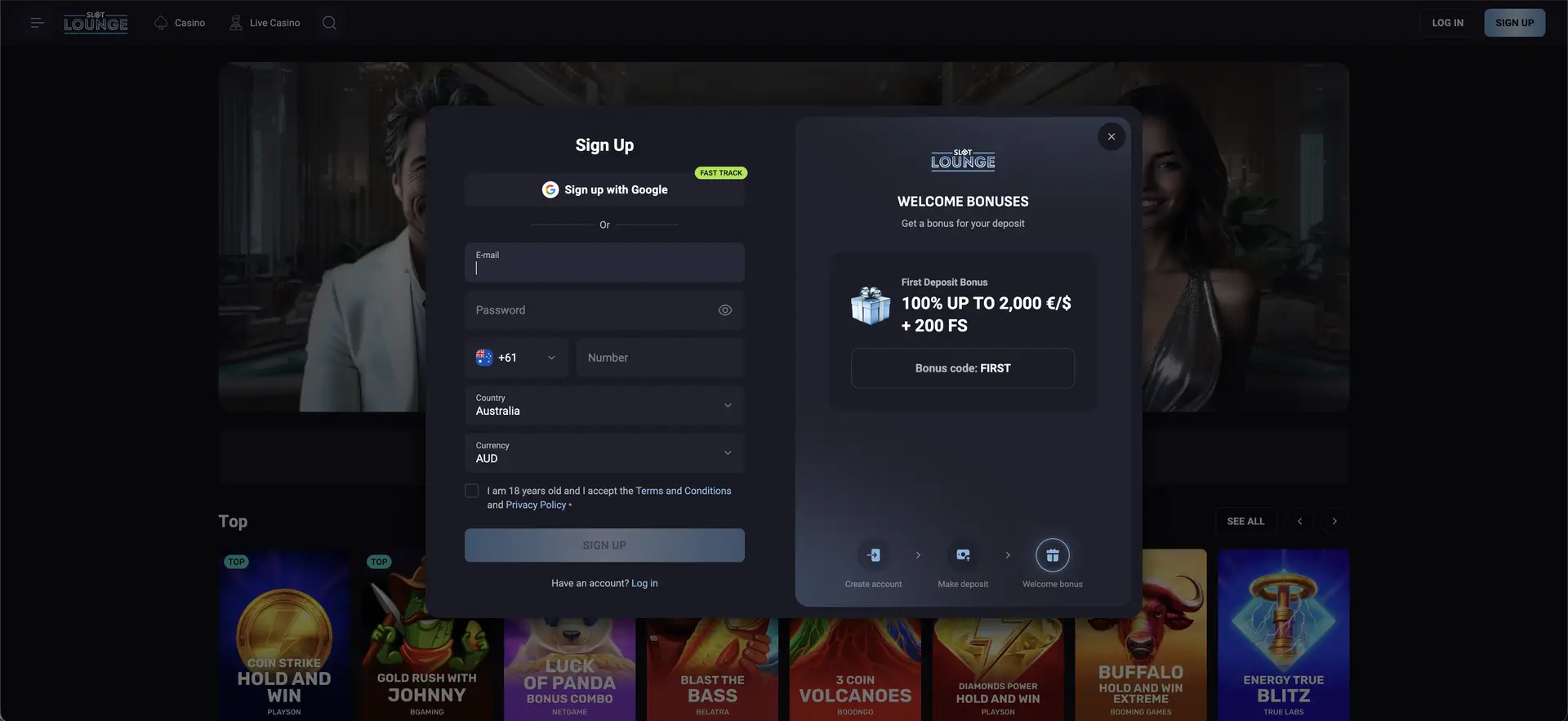
How to register at Slotlounge casino
The Sign Up button sits in the top-right corner of the Slotlounge casino site. Selecting it opens a modal registration window with the welcome bonus displayed alongside.
Google fast-track sign-up
- Select Sign Up, then Sign up with Google (marked Fast Track).
- Choose the Google account to use and authorise it.
- Complete any remaining fields - country, currency and the age-and-terms confirmation.
- The account opens, linked to your Google login.
This route removes the need for a separate Slotlounge password, but it also means the security of your Google account protects the casino account - a strong Google password and two-factor authentication are worth having in place.
Manual sign-up
- Select Sign Up in the top-right corner.
- Enter an email address - this becomes your login identifier and the channel for confirmations and recovery.
- Create a password using the visibility toggle to check it. Choose one not reused elsewhere.
- Add a mobile number with the +61 code selected.
- Set the country to Australia.
- Confirm the currency reads AUD - it defaults from the country but is editable, and governs your cashier limits.
- Tick the confirmation box stating you are 18 and accept the Terms and Conditions and Privacy Policy, both linked in the form.
- Select Sign Up. The welcome panel shows the First Deposit Bonus (100% up to 2,000 €/$ + 200 FS, code FIRST) ready to claim.
Choosing AUD as your account currency
The currency field is the one to check twice. It sets the deposit and withdrawal minimums and ceilings applied to the account, and it is not normally changeable once set. Slotlounge supports EUR, USD and crypto alongside AUD, so the field can be changed - but an Australian player selecting a different fiat currency would face conversion at every deposit and withdrawal. Confirm AUD before submitting rather than after.
What happens immediately after registration
- The account balance and controls replace the Log In and Sign Up prompts
- The cashier, with AUD limits - including card deposits and card withdrawals
- Real-money play across Slots, Live Casino, Bonus Buy, Instant Win, Jackpot, Hold & Win, Megaways and Table Games
- Live dealer tables from ICONIC21, Live Vegas and PLATI+
- Bonus eligibility, starting with the first deposit offer
- Tournament entry with live leaderboards
- Loyalty enrolment - CP and RCP accrue automatically on play
- The VIP Club path, which begins with qualifying deposits
The first deposit after registration
The account is open but empty. The first deposit activates the welcome package, and the opening stage is 100% up to 2,000 €/$ + 200 Free Spins with the code FIRST.
- Open the Payments section.
- Choose a method - Visa, Mastercard, Apple Pay, Google Pay, bank transfer, Neosurf, Paysafecard or crypto, from 20 €/$.
- Enter the amount, keeping the 2,000 bonus ceiling in mind.
- Enter the code FIRST before confirming.
- Confirm - all methods are fee-free - and check the bonus has credited.
The subsequent stages use SECOND, THIRD and FOURTH, each entered before its deposit.
Account verification after registration
No documents are requested at sign-up. Verification is separate and normally triggered before a first withdrawal. The standard set:
- Proof of identity - a valid government-issued photo document, fully legible
- Proof of address - a utility bill or bank statement, usually within the last three months
- Proof of payment method - where a card or e-wallet was used, confirmation it belongs to the account holder
Details must match the registration information. Because Slotlounge allows card withdrawals - which still run on banking days - submitting documents early means the check runs alongside play rather than adding to the payout time.
Registration requirements and restrictions
- Minimum age 18, confirmed by checkbox and verified against documents later.
- One account per person. Duplicates are normally closed at verification.
- Accounts are personal and payouts go to the verified account holder.
- Accurate details are required, since they form the basis of the verification check.
- Terms acceptance is binding, covering bonus rules and payout conditions.
Common registration problems
The form will not submit
Every mandatory field must be completed, including the age-and-terms checkbox at the foot of the form. Script-blocking extensions can also prevent submission - disable them or switch browser.
The email is already registered
An account exists on that address. Use password recovery from the login form rather than a second address, since duplicates are closed at verification. If you registered with Google, sign in with the Google option.
The mobile number is rejected
Check the +61 code is selected and the number is entered without a leading zero and without spaces or brackets.
The wrong currency was selected
Currency is not normally changeable after registration. Contact support before making a first deposit - it is far harder to resolve once transactions have been processed.
The Google sign-up did not complete
If the Google window closes without finishing, ensure pop-ups are allowed for the site and retry, or use the manual form instead.
Summary
Registration at Slotlounge takes a single screen and offers a Google fast-track for players who want it. The speed is real, but two fields repay a second look before submitting - the currency, which sets every cashier limit and cannot easily be changed, and the personal details, which will be checked against identification at verification. Get both right and the rest of the process, from the code-FIRST welcome bonus through to a first withdrawal, runs without the delays that catch most new accounts. And because Slotlounge allows card payouts, a card depositor who verifies early can cash out to the same card with minimal friction.
FAQ
How do I register at Slotlounge casino?
Select Sign Up, then either use Sign up with Google or fill in the form: email, password, a +61 mobile number, country Australia, currency AUD, and the 18+ and terms checkbox. It all sits on one screen.
Can I sign up with Google?
Yes. The Google fast-track option creates the account linked to your Google login, so there is no separate Slotlounge password. Protect the Google account accordingly.
What do I need to register?
An email you control, a password, an Australian mobile number and your date of birth. No documents at sign-up - verification comes later, before a first withdrawal.
Can I change my currency after registering?
Currency is set at registration and is not normally changeable. Confirm AUD before submitting, and contact support before a first deposit if the wrong currency was chosen.
Is there a bonus for registering?
The bonus attaches to the first deposit, not registration: 100% up to 2,000 €/$ + 200 free spins with the code FIRST. There is no standing no deposit offer, though a Telegram subscription bonus of 100 free spins exists subject to its terms.
What is the minimum age?
18, confirmed by checkbox and checked against documents at verification.
Can I open more than one account?
No. One account per person; duplicates are normally closed. Use password recovery or support if you cannot access an existing account.